Archive for the ‘Groovy’ Category

Updated version of the Dynamic Languages Shootout Game available

Sunday, August 17th, 2008

I updated my contribution to the “Dynamic Languages Shootout”.

I upgraded to Groovy 1.5.6 and to Grails 1.0.3.

New version of the Dynamic Languages Shootout Game available

Wednesday, February 27th, 2008

I updated my contribution to the “Dynamic Languages Shootout”.

I upgraded from Groovy 1.5.1 to Groovy 1.5.4 and from Grails 1.0RC4 to Grails 1.0.1.

First tests have shown performance improvements.

Memoization in Groovy with a Decorator

Wednesday, February 27th, 2008

Memoization is a well known optimization technique to avoid repeated calculations. With dynamic programming languages like Groovy it is possible to extend the behaviour of an already exisiting class at runtime. In Groovy this is accomplished with the Meta Object Protocoll and its ExpandoMetaClass.

In Groovy every class has a meta class that can be changed and extended at runtime. One method of this meta class is the invokeMethod() that has the following signature.

Object invokeMethod(Object object, String methodName, Object arguments)

This method controls the calls of methods in the class. By overwriting this method one can implement memoization easily.

class MemoizationDecorator {
	static void memoizeMethods(Class clazz, Set methods) {
		Map cache = [:]
		clazz.metaClass.invokeMethod = { String name, args ->
			def key
			def result
			if (methods.contains(name)) {
				// initialise the cache
				if (!cache[name]) cache[name] = [:]
				if (!cache[name][delegate]) cache[name][delegate] = [:]
				// is there already a memoized result?
				key = args.collect { it.hashCode().toString() }.join(’-')
				result = cache[name][delegate][key]
			}
			if (null == result) {
				// if there is no result, call the method
				def method = delegate.metaClass.getMetaMethod(name, args)
				if (method) result = method.invoke(delegate, args)
			}
			if (methods.contains(name)) {
				// store the result
				cache[name][delegate][key] = result
			}
			return result
		}
	}
}

The cache cache contains the results of the previous calls. The set methods contains the name of the methods that should get memoized.

Lets write a test for this class.

class TestClass {
    int fCalls = 0
    int gCalls = 0
    int f() { fCalls++ }
    int g() { gCalls++ }
}

def m0 = new TestClass()
MemoizationDecorator.memoizeMethods(TestClass, ['f'] as Set)
def m1 = new TestClass()

m0.f() + m0.f() + m0.f() + m0.g() + m0.g() + m0.g()
assert m0.fCalls == 3
assert m0.gCalls == 3

m1.f() + m1.f() + m1.f() + m1.g() + m1.g() + m1.g()
assert m1.fCalls == 1
assert m1.gCalls == 3

The object m0 is created before the memoization decorator was called. Therefore all the three calls to the method f were executed. For object m1 the method f was called only once.

Well the observant reader will have noticed, that the results of the computations are different for m0 and m1. This is a reminder that the correctness is preserved only for purely functional methods, e. g. methods without internal state. This is not the case in our example.

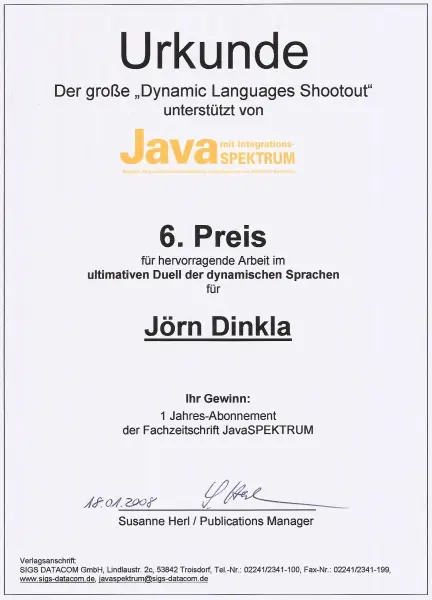
Jörn Dinkla came 6th place at the Dynamic Languages Shootout at OOP 2008

Wednesday, January 23rd, 2008

The german magazine JavaSpektrum organized the “Dynamic Languages Shootout” contest for the OOP 2008 conference. The task was the creation of a computer game similiar to Scrabble in a dynamically typed programming language.


Joern Dinkla came 6th at the Dynamic Languages Shootout/OOP 2008

I used Groovy and Grails and came 6th place. See the web pages for further information.

Writing Eclipse plugins with Groovy

Thursday, January 17th, 2008

Writing plugins for Eclipse with other languages than Java is not officially supported, but there is a way to write an Eclipse plugin with Groovy only. As prerequisites you need Eclipse with a JDT and the Groovy Eclipse plugin.

Follow the following steps. The source code is also available.

1. Create a new Plugin-in project, do not use any templates.
2. Add the Groovy Nature to the project.
3. Create a Java package under src
4. Create a Groovy class HelloGroovyWorld with the following contents

package hellogroovyworld

import org.eclipse.jface.action.IAction
import org.eclipse.jface.viewers.ISelection
import org.eclipse.ui.IWorkbenchWindow
import org.eclipse.ui.IWorkbenchWindowActionDelegate
import org.eclipse.jface.dialogs.MessageDialog

class HelloGroovyWorld implements IWorkbenchWindowActionDelegate {

	private IWorkbenchWindow window

	void run(IAction action) {
		MessageDialog.openInformation(
			window.getShell(),
			"Hellogroovyworld Plug-in",
			"Hello, Groovy world")
	}

	void selectionChanged(IAction action, ISelection selection) {}

	void dispose() {}

	void init(IWorkbenchWindow window) {
		this.window = window
	}
}

5. Edit the plugin.xml file:

5a. On the Dependencies tab add org.eclipse.ui and org.eclipse.core.runtime.
and org.codehaus.groovy.

5b. On the Runtime tab add bin-groovy to the classpath

5c. On the Extensions tab add an org.eclipse.ui.actionSets extension, set visible to true.
Add a menu and an action (Left click the ActionSet, right click and choose “new, menu and action”) and
choose HelloGroovyWorld as the class for the action. The plugin.xml is shown below.

   <extension
         point="org.eclipse.ui.actionSets">
      <actionSet
            id="hellogroovyworld.actionSet1"
            label="Groovy ActionSet"
            visible="true">
         <menu
               id="groovyMenu"
               label="Groovy Menu">
         </menu>
         <action
               class="hellogroovyworld.HelloGroovyWorld"
               id="hellogroovyworld.action2"
               label="Groovy World"
               menubarPath="groovyMenu"
               toolbarPath="groovyMenu"
               tooltip="Hello Groovy World">
         </action>
      </actionSet>
   </extension>

Now run the project as an Eclipse Application.

Hello Groovy World

New version of the EMFBuilder is available

Tuesday, January 8th, 2008

A new version 0.04 of the EMFBuilder is available.

This version works with Groovy 1.5.

Using UML2 with Groovy

Thursday, November 29th, 2007

The UML2 project provides an EMF based implementation of the UML 2.x metamodel in Java.

With the EMFBuilder it is possible to create and process UML2 models.

def builder = new EMFBuilder(UMLFactory)
def epo2Model = builder.Model(name: 'epo2') {
    packagedElement {
        def stringPrimitiveType = PrimitiveType(name: 'String')
        def orderStatusEnumeration = Enumeration(name: 'OrderStatus') {
            ownedLiteral {
                EnumerationLiteral(name: 'Pending')
                EnumerationLiteral(name: 'Back Order')
                EnumerationLiteral(name: 'Complete')
            }
        }
        def addressClass = Class(name: 'Address' ,isAbstract: true) {
            ownedAttribute {
                Property(name: 'name', type: stringPrimitiveType, lower: 0, upper: 1)
                Property(name: 'country', type: stringPrimitiveType, lower: 0, upper: 1)
            }
        }
...

Further Information can be found on the UML2 page.

Using EMF with Groovy

Monday, October 22nd, 2007

Groovy supports the creation of internal DSLs with the Groovy builder technique. The following class diagram defines a model.
EMF example model

This model can be formulated in EMF and code can be generated. With the EMFBuilder the generated Java code can be used as seen in the following example.

def builder = new EMFBuilder(LibraryFactory)
def writer
def library = builder.Library( name : 'Hardboiled Library') {
    writers {
        writer = Writer( name : 'Raymond Chandler')
    }
    books {
        Book ( title: 'The Big Sleep', pages: 234,
                  category: BookCategory.MYSTERY_LITERAL, author: writer)
    }
}

See the EMFBuilder for further information.


Last modified: